How Unlocker works
TokenTable Unlocker is a self-custodial system for managing and unlocking tokens on EVM, Solana, and Starknet. The example below follows the core workflow, which involves every core smart contract.
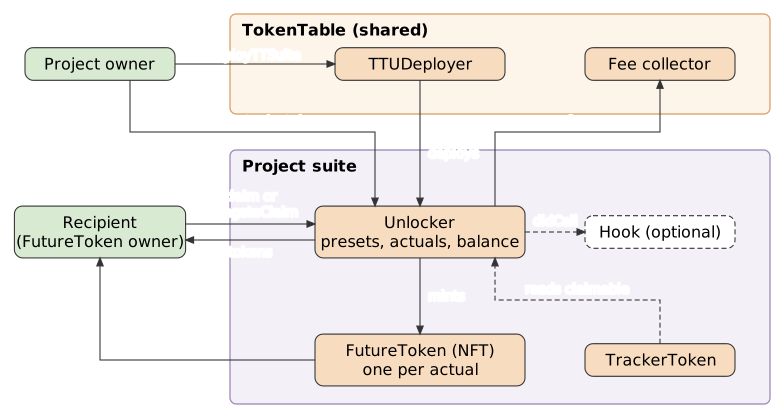
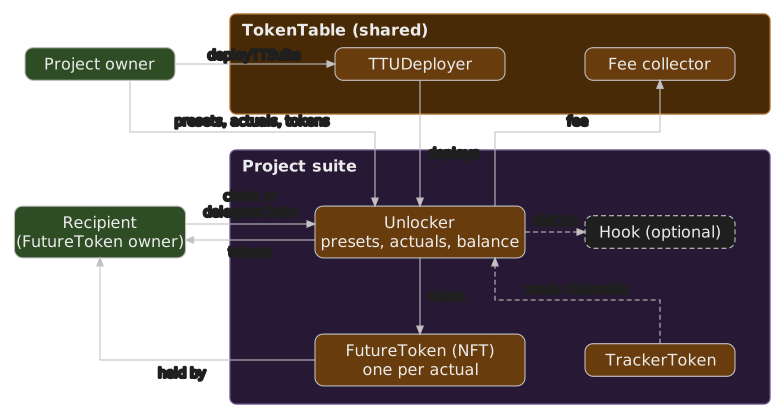
All time values, including timestamps, are in seconds.
Example scenario
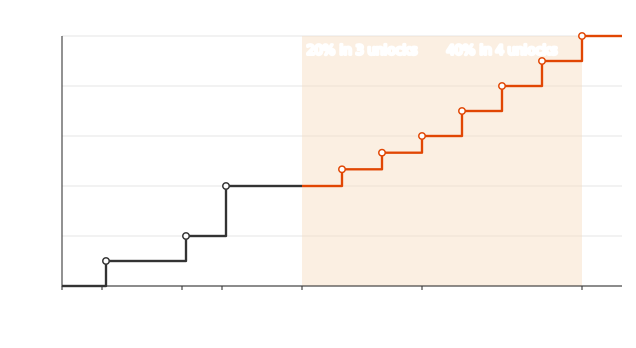
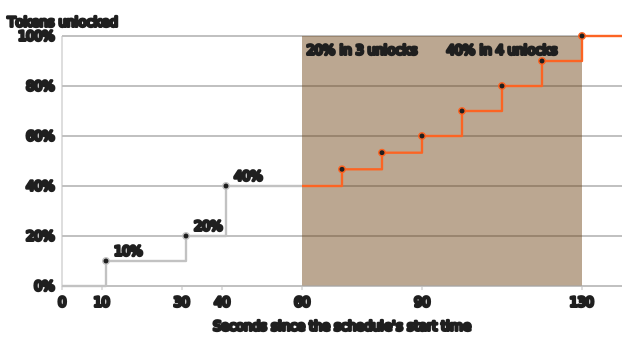
A startup has raised funds, hired its core team, and uses TokenTable to distribute tokens to its investors and employees. The founders need to create and enforce unlocking schedules for those tokens. In this example, the schedule looks like this:
Founder workflow
1. Deploy a TokenTable suite
Each startup or organization deploys its own TokenTable instance and can reuse it for any number of unlocking schedules. To deploy, call deployTTSuite(...) on the TokenTable deployer (TTUDeployer) with a unique projectId. The caller becomes the owner of the new Unlocker. The call returns the Unlocker and FutureToken, and the TokenTableSuiteDeployed event also includes the TrackerToken address. To deploy, deposit and create schedules in one transaction, use TTUMulticallDeployer.multicallDeploy instead (see Deployer).
2. Create a preset
A preset holds the information that every stakeholder on the same unlocking schedule shares. For example, all investors in one fundraising round follow the same unlocking curve and claim intervals. To create presets, call createPresets(...) with these parameters:
presetIds: an array with onebytes32ID per preset. An ID can be any value that is not zero and not already in use.presets: an array ofPresetstructs, each with these fields:linearStartTimestampsRelative: the start time of each linear segment. Every part of a schedule is a linear segment: a cliff release is a segment that lasts 1 second, and a cliff waiting period is a segment that unlocks 0%. The times are relative to the start time, which the preset does not specify.linearEndTimestampRelative: the end time of the final linear segment. It must be greater than the last value inlinearStartTimestampsRelative.linearBips: the number of basis points (bips) each linear segment unlocks. Cliff waiting periods unlock 0 bips. The values must add up to the hardcodedBIPS_PRECISIONconstant, 10000, orcreatePresetsreverts withInvalidPresetFormat.numOfUnlocksForEachLinear: the number of unlocks in each linear segment. The minimum is 1, and a segment must last at least as many seconds as it has unlocks, orcreatePresetsreverts. Use 1 for cliff waits and releases.stream: whether recipients receive unlocked tokens in discrete unlocks or as a constant stream. Whenstreamis true,numOfUnlocksForEachLinearis ignored and each segment unlocks once per second.
linearStartTimestampsRelative, linearBips and numOfUnlocksForEachLinear must have the same length, and the values in linearStartTimestampsRelative must be strictly increasing.
These are the parameters for the schedule in the graph above:
linearStartTimestampsRelative: [0, 10, 11, 30, 31, 40, 41, 60, 90],
linearEndTimestampRelative: 130,
linearBips: [0, 1000, 0, 1000, 0, 2000, 0, 2000, 4000],
numOfUnlocksForEachLinear: [1, 1, 1, 1, 1, 1, 1, 3, 4],
stream: false
Parameters for some other unlocking curves:
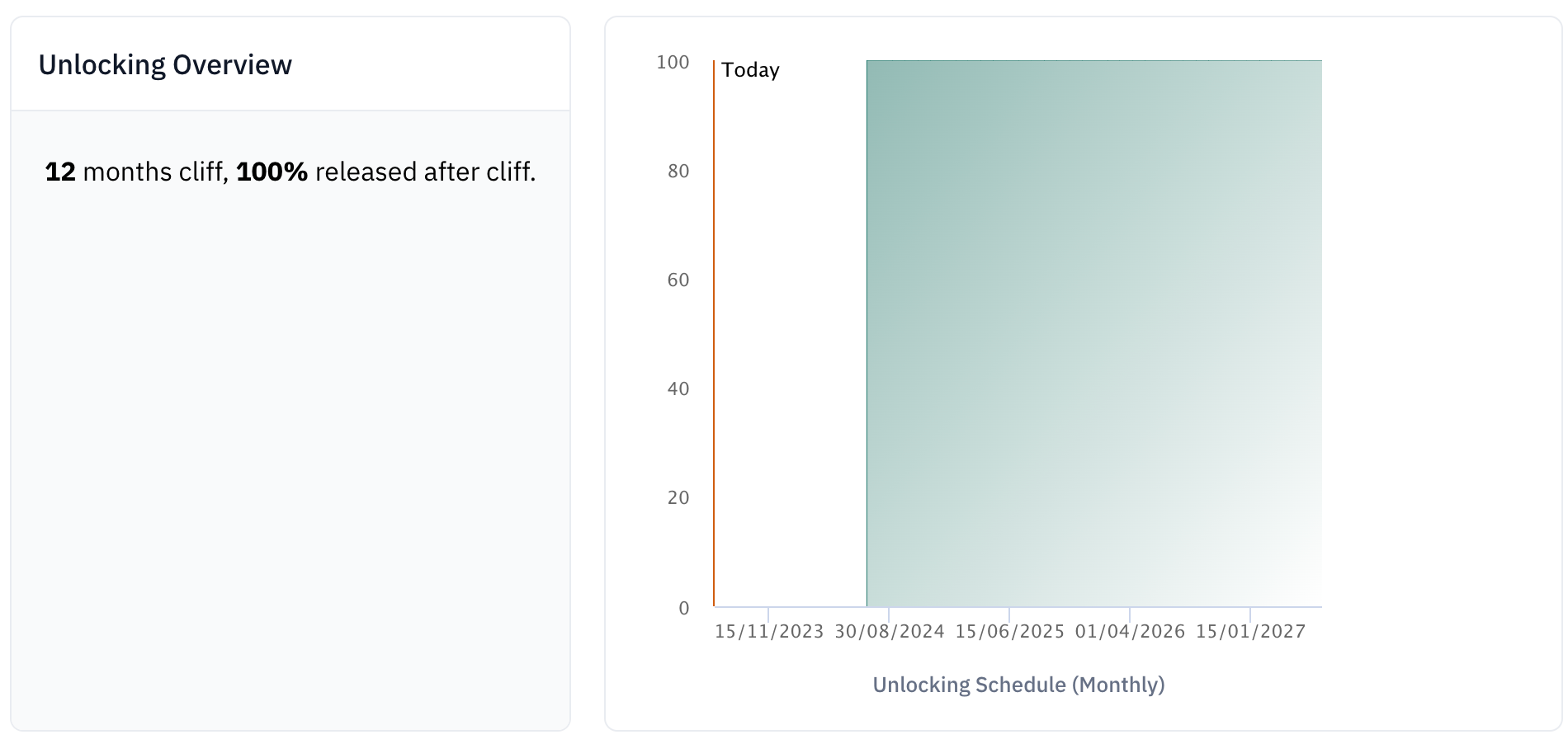
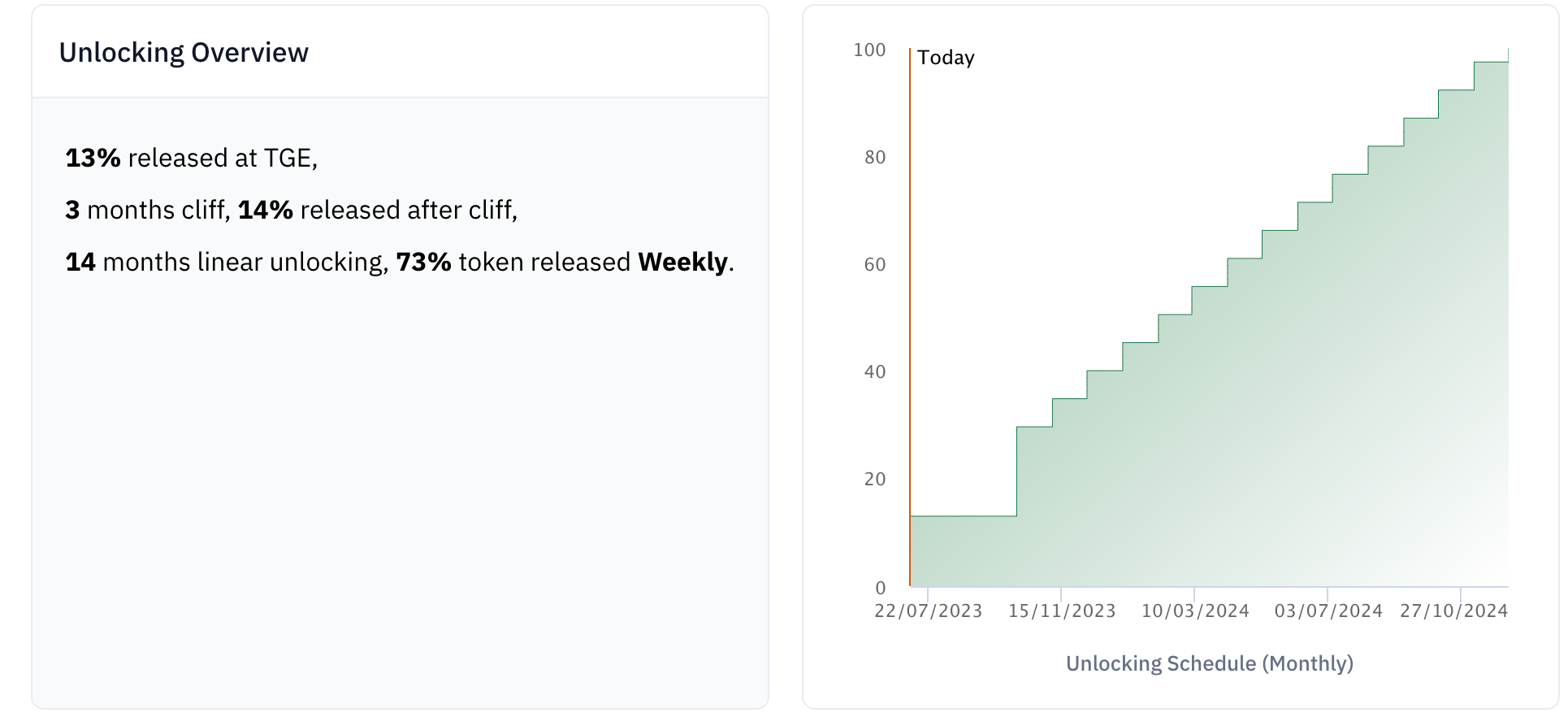
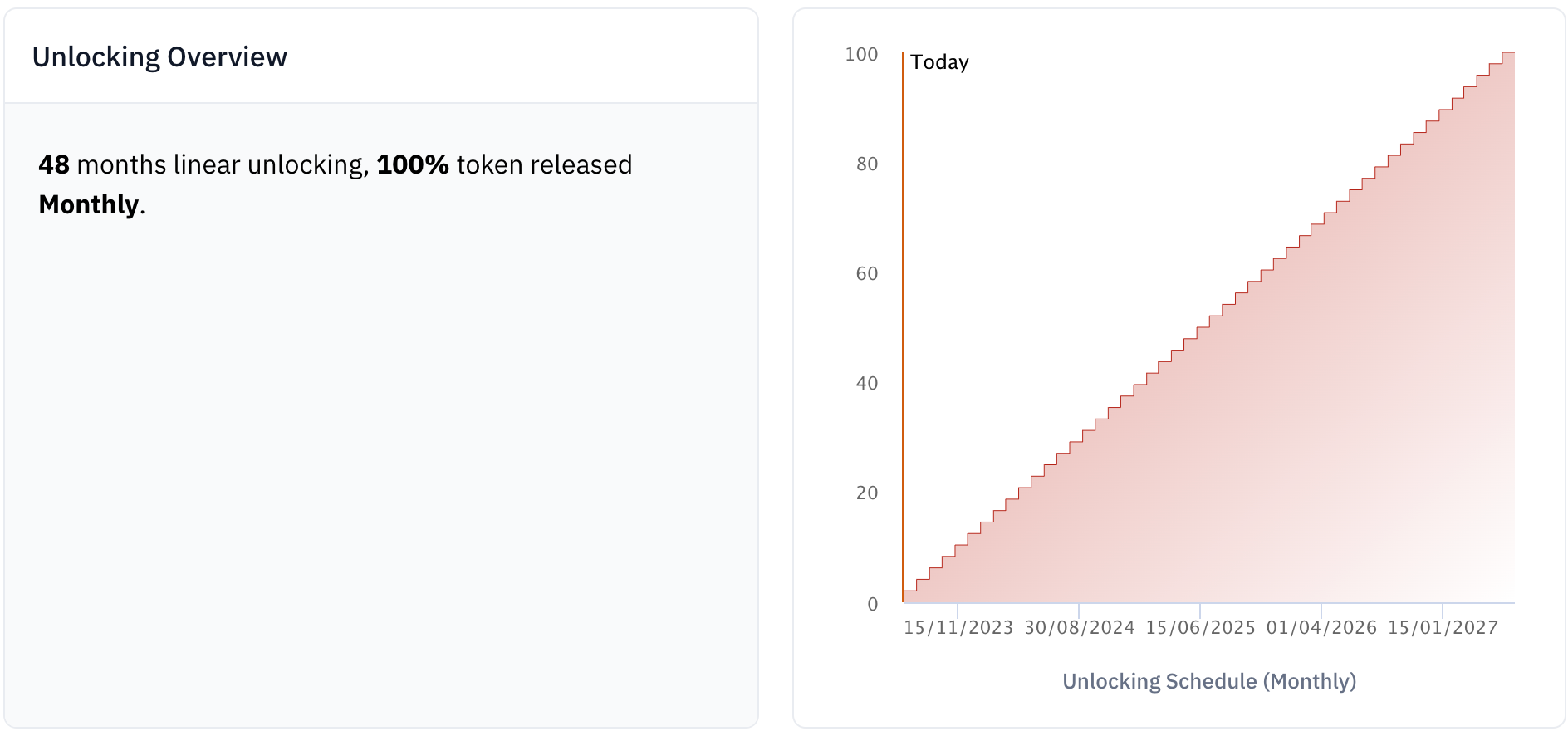
3. Create an actual
An actual is based on a preset and holds the details for a single token recipient, such as the total locked amount and the start time. To create actuals, call createActuals(...). Example parameters:
recipients: [0xd8da6bf26964af9d7eed9e03e53415d37aa96045],
actuals: [{presetId: keccak256('seed'), startTimestampAbsolute: 1687263601, amountClaimed: 0, totalAmount: 10000}],
recipientIds: [0],
batchId: 0,
extraData: 0x
recipients: the addresses that receive the unlocking schedules.actuals: an array ofActualstructs:presetId: the preset to use, created in the previous step.startTimestampAbsolute: the start time of this schedule, as a standard UNIX timestamp in seconds. It does not have to be in the future. You can look up the current timestamp at https://www.unixtimestamp.com/.amountClaimed: how much of this schedule has already unlocked. This is only useful when you migrate from another unlocking platform: it lets unlocking continue where it left off instead of starting over. It must be less thantotalAmount, or the call reverts withInvalidSkipAmount.totalAmount: the total number of tokens to unlock.
recipientIds: only emitted in an event, for the TokenTable frontend.batchId: only emitted in an event, for the TokenTable frontend.extraData: passed directly to the hook.
The referenced preset must already exist, or the call reverts with PresetDoesNotExist.
The function safely mints a FutureToken NFT to each recipient's address. Unlocked tokens go to the owner of the corresponding FutureToken, not to the recipient's address. If transfers are enabled, the original recipient can transfer the FutureToken to another address; otherwise transfers revert. Transfers are enabled either at deployment (isTransferable) or later by the founder with enableTransfer() on the FutureToken. Once enabled, they cannot be disabled.
The token ID of the minted FutureToken is the actualId, which appears in the ActualCreated event in the transaction receipt.
4. Deposit tokens
To deposit tokens, make a standard ERC-20 transfer(...) with the Unlocker as to. There is no deposit function, and deposits are not tied to a specific actual: all schedules in an Unlocker draw from the same token balance. Partial deposits are allowed, but a claim reverts if the claimable amount is greater than the amount deposited. Founders should check that the balance covers what recipients can claim and top it up as needed. If a claim fee is configured, it is also paid in the project token out of this balance, so the deposit must cover the fee too.
5. (Optional) Withdraw deposited tokens
The founder can withdraw any unclaimed tokens immediately by calling withdrawDeposit, as long as withdrawals are enabled (isWithdrawable). Withdrawals can be disabled at deployment or later with disableWithdraw, and cannot be re-enabled. After that, the founder can only withdraw through an emergency withdraw request: the founder calls setEmergencyWithdrawRequestStatus(true) on the Unlocker, TokenTable approves it with handleEmergencyWithdrawRequest on the deployer, and the founder then calls withdrawDeposit. Each approval covers one withdrawal.
6. (Optional) Cancel a schedule
To stop a schedule immediately and permanently, the founder calls cancel. This only works while cancellation is enabled (isCancelable). Tokens that unlocked before the cancellation but are not yet claimed stay claimable by the recipient. If the founder created the schedule by mistake, they can also wipe the recipient's unclaimed tokens by setting that schedule's entry in the shouldWipeClaimableBalance array to true.
7. (Optional) Enable delegate claiming
The founder can add a claiming delegate by calling setClaimingDelegate(delegate, true). A claiming delegate can call delegateClaim to claim for any recipient. If the founder also calls setCurrentChainSupportsExternalDelegateRegistry(true), wallets that a FutureToken owner has delegated to through delegate.xyz can call delegateClaim for that owner's schedules. Claimed tokens go to the current owner of each schedule's FutureToken. Delegate claiming helps when the recipient uses a cold wallet or cannot pay gas.
Stakeholder workflow
1. Add FutureToken and TrackerToken to a wallet
After adding the project's FutureToken and TrackerToken to their wallet, a stakeholder can manage their FutureToken NFT and see their current claimable amount there, without visiting the TokenTable website.
2. Claim unlocked tokens
Stakeholders claim either on the TokenTable website or by calling claim from a block explorer.
3. (Optional) Claim from a canceled schedule
If a stakeholder's schedule was canceled, they can still claim any unlocked tokens left in it by calling claim.